
Appearance
Field Visits report
An Excel export of field visits for the growers you choose, one row per visit, with ground cover, leading tuber size, issues and comments. Visits recorded before a field was planted are included.
Filters
In the left sidebar, open Reporting › Download Reports, then click Excel on the Field Visits row.
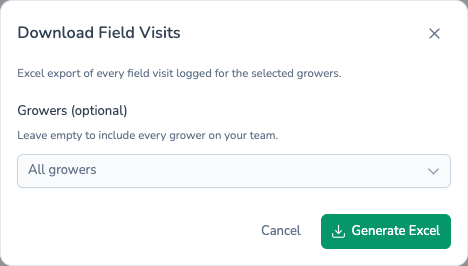
| Field | Required? | If left empty |
|---|---|---|
| Growers (optional) | No | Every grower |
That's the only filter. The report covers the season chosen in the sidebar, and only the teams chosen in the sidebar team picker.
What's in the file
The workbook has one sheet, Planting Visits, with one row per visit, newest first. The columns are:
| Column | What it shows |
|---|---|
| Grower | The grower the visit was for. |
| Field | The field visited. |
| Reference | The planting's customer reference. A visit recorded before planting has no planting, so this shows a dash. |
| Variety | The variety. |
| Irrigation | The planting's irrigation type. |
| Planted Area | The planting's planted area in hectares. |
| Planted, Emerged, Desiccated | Always show a dash. Planting dates aren't filled in on this report; use the Planting Inventory report for them. |
| Location | The field's nearest place. |
| What3Words | The field's what3words address. |
| Notes | The planting's notes. |
| Added By | Who recorded the visit. |
| Visit Date | When the visit happened. |
| Ground Cover % | Ground cover at the visit. |
| Leading Tuber (mm) | Leading tuber size at the visit. |
| Issues | Issues raised on the visit. The cell is shaded yellow, amber or red for the most serious crop issue (low, medium or high). |
| Crop Comments | Crop comments from the visit. |
| Action Comments | Actions required or taken. |
For a visit recorded before planting, Variety, Irrigation, Notes, Ground Cover % and Leading Tuber (mm) show a dash as well, and Planted Area is empty. Its Grower, Field, Location and What3Words are filled in as usual.
Filename
planting-visits.xlsx
What's next
- Planting Inventory — The plantings these visits belong to, with their dates and seed.
- Store Visits — The storage equivalent, as a printable PDF.
- Scheduling reports — Have this file land in your inbox every week.