
Appearance
Latest Store Visits report
A short PDF of the most recent visits across your stores. It works well as a Monday-morning check of what's been seen lately.
Filters
In the left sidebar, open Reporting › Download Reports, then click PDF on the Latest Store Visits row.
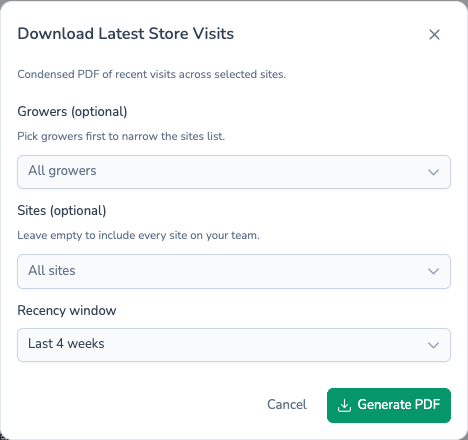
| Field | Required? | If left empty |
|---|---|---|
| Growers (optional) | No | Every grower |
| Sites (optional) | No | Every site |
| Recency window | Choose one | Starts on Last 3 weeks |
Recency window sets how far back the report looks, counting back from today:
- Last week
- Last fortnight
- Last 3 weeks (the default)
- Last 4 weeks
- Last 8 weeks
The season is the one chosen in the sidebar, and the report only covers the teams chosen in the sidebar team picker.
What's in the file
The PDF is landscape. A heading shows the season, the number of weeks covered and today's date.
Below it is a single table with one row per visit. Stores are listed in name order, and each store shows up to its three most recent visits in the window, newest first. Each row shows:
- The store and its site.
- The visit date and who visited.
- Store comments, crop comments and actions, with any issues colour-coded by severity.
- The average crop temperature, with its minimum and maximum.
- The set point, with the difference between it and the average temperature.
Stores with no visits in the window are left out. If no store has been visited in the window, you'll see a No data message instead of a file.
For every visit this season, use the Store Visits report.
Filename
latest-store-visits-report-{date}.pdf
What's next
- Store History — Every visit this season as a spreadsheet.
- Scheduling reports — Email yourself this report every Monday.