
Appearance
Store Visits report
A PDF of everything recorded against your stores this season. Each store gets its own page, with the stock in each bay, the sprout treatments applied, and every visit with its comments, issues and crop temperature.
The PDF you can download from inside a single store, described in Exporting store history, uses the same layout.
Filters
In the left sidebar, open Reporting › Download Reports, then click PDF on the Store Visits row.
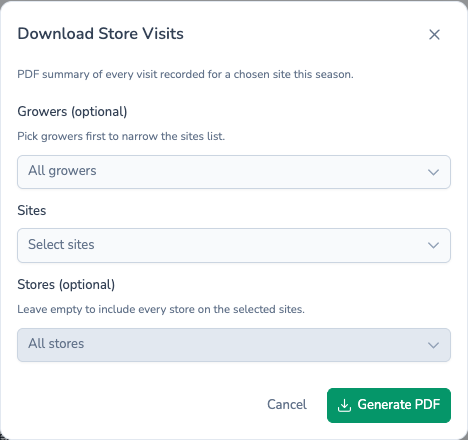
| Field | Required? | If left empty |
|---|---|---|
| Growers (optional) | No | Every grower |
| Sites | Yes | — |
| Stores (optional) | No | Every store on the chosen sites |
Pick growers first to narrow the Sites list, or go straight to Sites. Stores is disabled until you've picked at least one site.
The season is the one chosen in the sidebar, and the report only covers the teams chosen in the sidebar team picker.
Sites is required
This is the only report where Sites must be filled in. The dialog doesn't mark it as required, but Generate PDF shows an error until you pick a site.
What's in the file
Stores are grouped by site, then listed by name. A store only appears if it has a visit or stock recorded this season. Each store starts on a new page with:
- A header with the store name, grower, site, nearest place and what3words address, plus the store's team and the season.
- Store Inventory, listed bay by bay. Each stock shows the field, grower, variety, planting reference, loading date and lifting conditions, with tonnage In, Out and Balance in tonnes.
- Store Treatments, oldest first. Each shows the product, its active ingredient and MAPP number, the application date and times, the earliest movement date with a Safe to move or Unsafe to move tag, store and crop comments, and the application rate.
- Visits, newest first. Each shows the date and who visited, the store comments, crop comments and actions, any issues (colour-coded by severity), the average crop temperature with its minimum and maximum, and the set point with the difference from it.
A section is left out when there's nothing to show, for example a store with no treatments this season.
Filename
The filename depends on how many sites you chose:
- One site:
{site-name}-{date}.pdf, for exampledemo-site-2026-10-17.pdf. - Several sites:
store-visits-{number}-sites-{date}.pdf.
What's next
- Latest Store Visits — Just the most recent visits across your stores.
- Store History — The same visits as a spreadsheet, one sheet per store.
- Scheduling reports — Get this PDF in your inbox every week.