
Appearance
Sprout Products
Sprout products are the chemicals and treatments used in store to suppress sprouting, such as 1,4SIGHT, Biox-M, ARGOS and Ethylene. Setting them up here means doses and product names are consistent every time someone records a treatment.
This page only appears if your team uses Storage.
Step 1 — Open the Sprout Products list
In the sidebar, under Record Keeping, click Team Admin. The section panel opens beside the sidebar; click Sprout Products.
Potato Diary ships with a shared starter set of common products. You can't edit or delete these, but you can add your own alongside them.
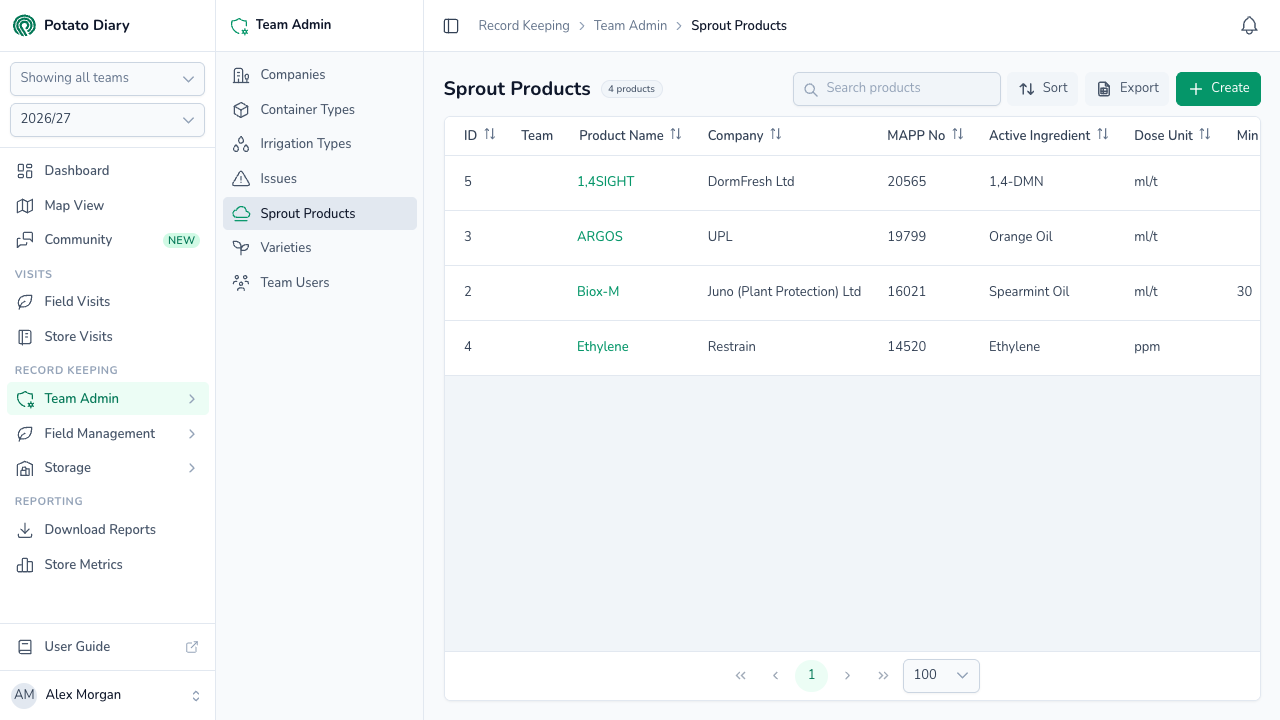
The columns show:
- ID: Potato Diary's internal reference.
- Team: which team owns this product. Empty means it's a shared default available to every team.
- Product Name: the trade name. Click it to open the action menu.
- Company: who makes or supplies the product.
- MAPP No: the UK MAPP registration number, useful for compliance reporting.
- Active Ingredient: the chemical or biological active.
- Dose Unit: ml/t or ppm.
- Min Dose / Max Dose: the expected dose range for one application.
- Max Total Dose: the most that can be applied in total.
- Application Interval (Days): the minimum number of days between two applications.
- Movement Interval (Days): the minimum number of days after an application before stock can be moved out.
You can sort by any column except Team. The search box is labelled Search products.
Step 2 — Click Create
At the top right of the page, click the green + Create button.
Step 3 — Fill in the product
A Create A Product dialog opens. Only Team and Product Name are required. The form is taller than the dialog, so scroll down to reach the lower half.
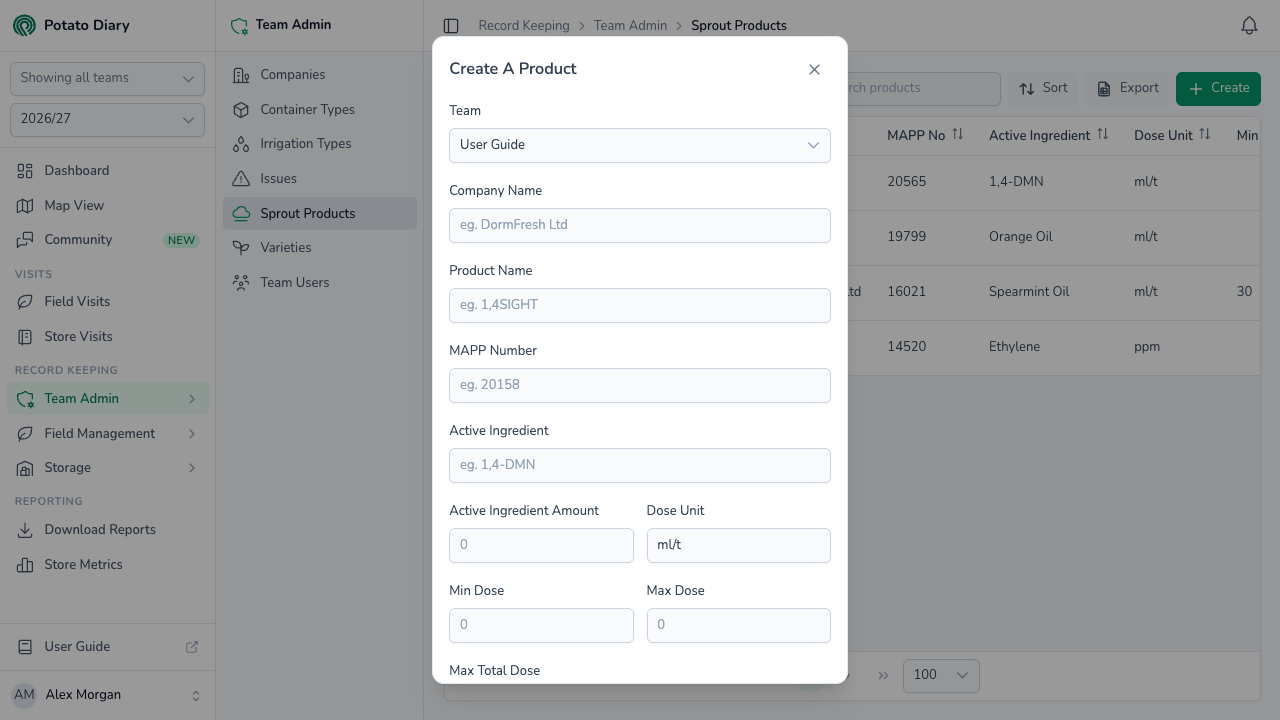
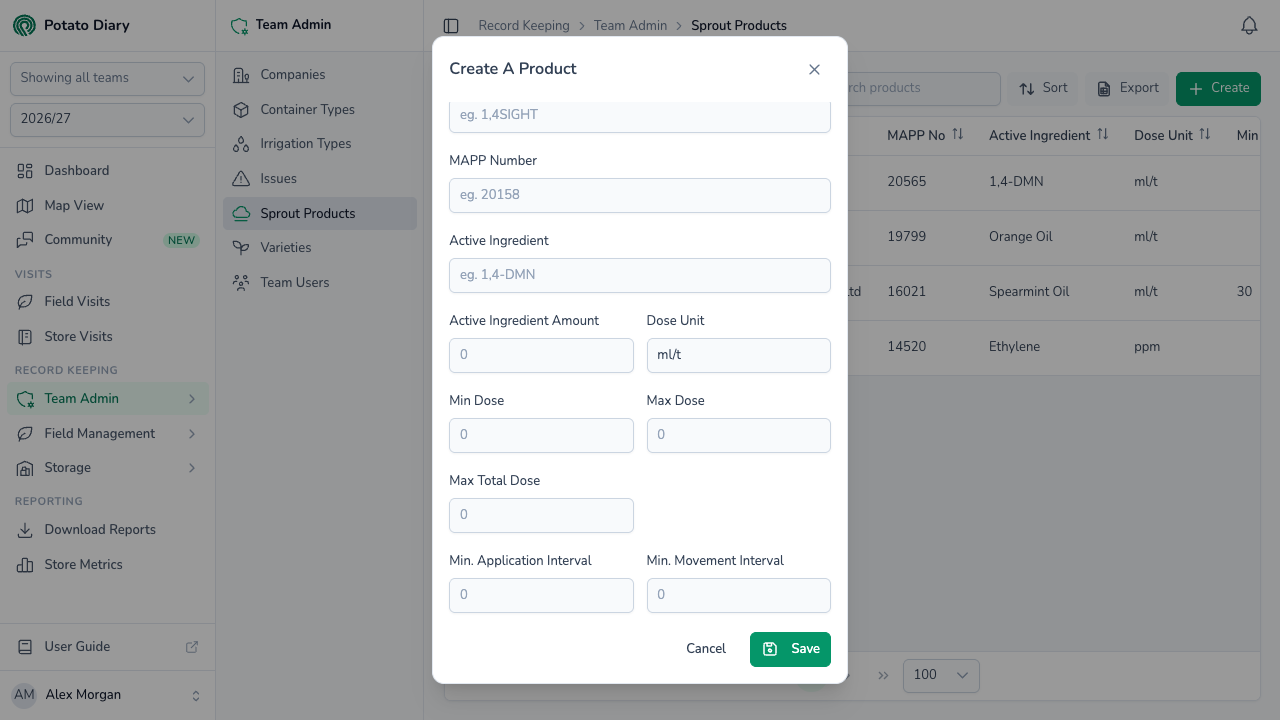
| Field | What to enter |
|---|---|
| Team | The team this product belongs to. You can't change it later. |
| Company Name | The supplying or manufacturing company, for example DormFresh Ltd or UPL. |
| Product Name | The trade name as it appears on the label, for example 1,4SIGHT. |
| MAPP Number | The UK pesticide registration number, where there is one. |
| Active Ingredient | The chemical or biological active, for example 1,4-DMN or Spearmint Oil. |
| Active Ingredient Amount | The concentration, as a whole number, where it makes sense. |
| Dose Unit | Type exactly ml/t (millilitres per tonne) or ppm (parts per million). Anything else is rejected when you save. |
| Min Dose / Max Dose | The accepted dose range for one application. |
| Max Total Dose | The most that can be applied in total, where there's a limit. |
| Min. Application Interval | The minimum number of days between two applications, where there's a limit. |
| Min. Movement Interval | The minimum number of days after an application before stock can be moved out of store, where there's a limit. |
WARNING
The three dose boxes let you type decimals, but Potato Diary only saves whole numbers from 0 to 999. A decimal dose shows an error when you click Save. Round to the nearest whole number instead.
Step 4 — Click Save
The product is added to the list and you can now pick it when someone records a sprout-suppression treatment in store.
Editing or deleting a product
Click a product's name to open the action menu:
- Edit opens the same form. Team is locked.
- Copy is greyed out. It isn't available yet.
- Delete asks you to confirm.
Edit and Delete are always greyed out for the shared products.
WARNING
Nothing stops you deleting a product that's already been used in a treatment, and there's no way to undo it in the app. It disappears from the list and from the treatment form's product picker. Treatments that used it keep their link to it behind the scenes, but no longer show it. If a product is still in your treatment history, consider leaving it in place.
What's next
- Varieties — Link the potato varieties your team grows from Potato Diary's master list.
- Treatments tab — Record a sprout-suppression treatment in a store.