
Appearance
Varieties
Varieties are the potato cultivars your team grows: Maris Piper, King Edward, Markies and so on. Potato Diary keeps a master list of every variety it knows about. The Varieties page is where you pick which ones your team uses, set a default expected yield, and choose a colour that identifies each variety on maps and charts.
Linking a variety is what makes it appear in your team's variety pickers. The link isn't tied to a season, so you only need to do it once.
This page only appears if your team uses Storage or Field Management.
Step 1 — Open the Varieties list
In the sidebar, under Record Keeping, click Team Admin. The section panel opens beside the sidebar; click Varieties.
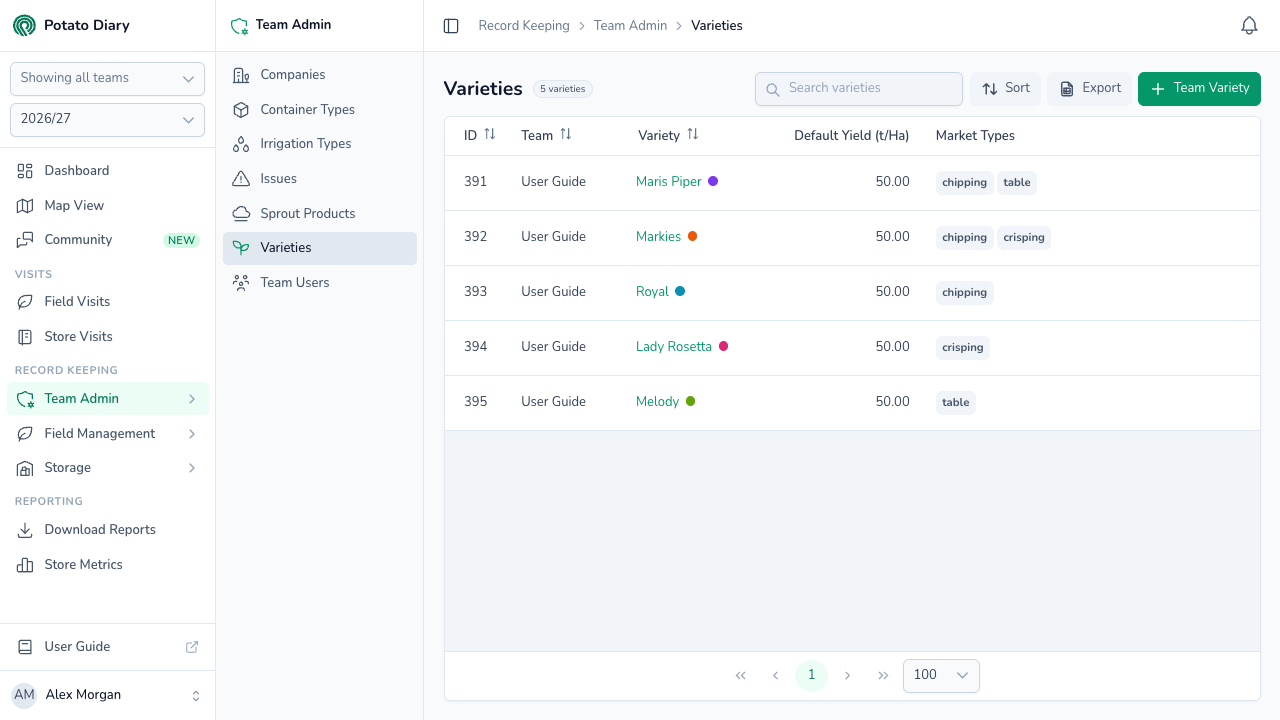
The columns show:
- ID: Potato Diary's internal reference.
- Team: which team this variety is linked to.
- Variety: the variety name, with a coloured dot if you've chosen a colour for it. Click the name to open the action menu.
- Default Yield (t/Ha): the expected yield Potato Diary pre-fills on new plantings of this variety. Shows - if you haven't set one.
- Market Types: which market sectors the variety is grown for, such as chipping or salad.
You can sort by ID, Team or Variety.
Step 2 — Click + Team Variety
At the top right of the page, click the green + Team Variety button. It's named differently from other Team Admin pages because you're linking your team to a variety in Potato Diary's master list, not creating a new one.
Step 3 — Pick the variety and set its defaults
A Link A Variety dialog opens.
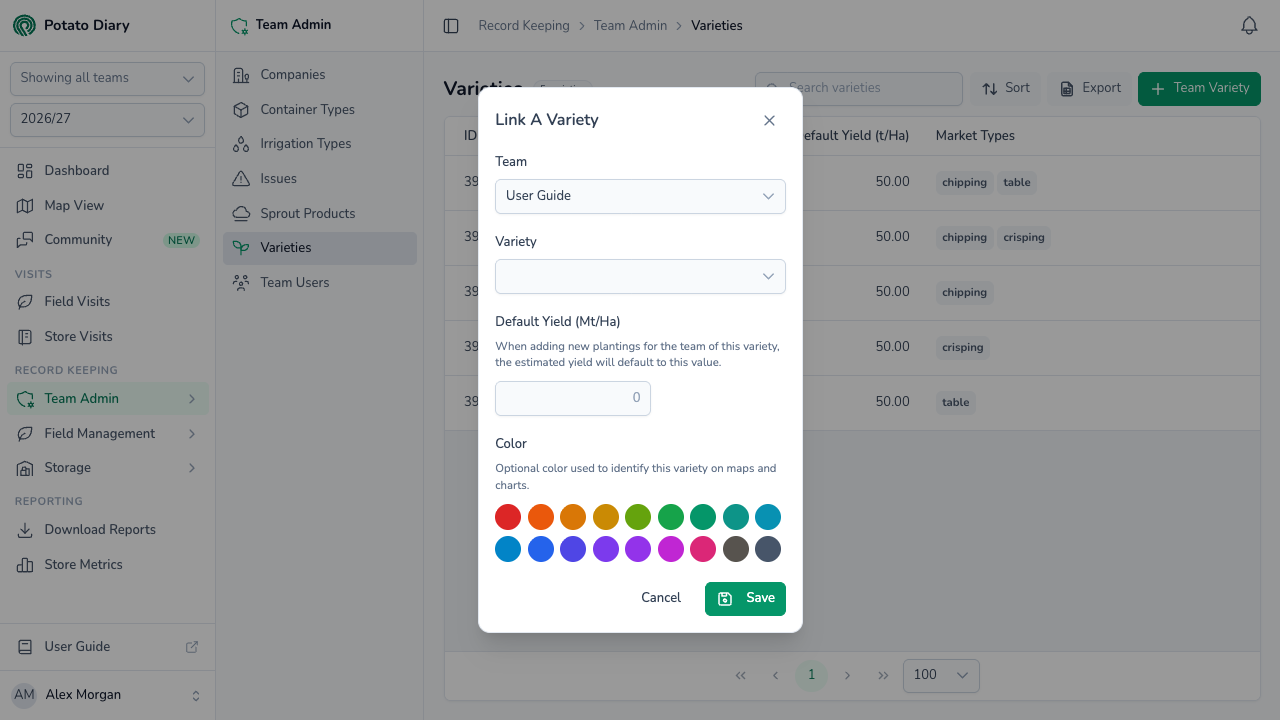
| Field | What to enter |
|---|---|
| Team | The team this variety is being linked to. You can't change it later. |
| Variety | Pick the variety from Potato Diary's master list. Type in the box at the top of the list to narrow it down. You can't change it later. |
| Default Yield (Mt/Ha) | Optional. Your team's typical yield in tonnes per hectare, from 0 to 100. New plantings of this variety pre-fill with this number, and you can change it on each planting. |
| Color | Optional. Pick a colour swatch to identify the variety on maps and charts. The app is easier to read when each variety has its own colour. |
TIP
If a variety you grow isn't in the master list, get in touch with Potato Diary support. Adding it to the master list means every team can use it.
Step 4 — Click Save
The variety is now linked to your team and appears in variety pickers, for example when you create a planting or add stock to a store.
TIP
You don't have to come to this page first. When you add stock to a store and the variety you need isn't in the list, click Variety not listed? Link one to this team under the Variety picker. It opens the same Link A Variety dialog. You'll only see that link if you're allowed to link varieties.
Editing or unlinking a variety
Click a variety's name to open the action menu:
- Edit reopens the Link A Variety dialog so you can change the default yield or colour. Team and Variety are locked.
- Unlink removes the variety from your team. A Delete Link box asks you to confirm; click Delete.
Unlinking only stops the variety appearing in your team's pickers. It doesn't remove it from Potato Diary's master list, and other teams keep their links.
Both options are greyed out if you're not allowed to link varieties for that team.
What's next
- Team Users — Invite people to your team and manage what they can see and do.
- Creating a planting — Plant a linked variety in a field.
- Stocks tab — Add stock of a variety to a store.