
Appearance
Storage risk
Potato Diary reads every store's visits, stock and treatments and gives the store a risk band: Low, Moderate, High or Critical. The band tells you which stores need attention first. Alongside it you get a short written analysis that explains what's behind the band and suggests what to do next.
This guide explains where the band appears, what each band means, what moves a store from one band to another, and how to read the full analysis.
Who can see it
Everyone in a team that uses Storage can see storage risk. You see it for the stores you have access to, in the same places you see those stores. There's nothing to switch on.
Where you'll see it
- The Dashboard: the Storage Risk card lists every store's latest band. See The Dashboard.
- The store view: a coloured chip next to the store's name, and a Current Storage Risk card at the top of the Details tab.
- Visit cards: a band pill on each store visit, showing the store's risk after that visit. You'll find these on Visits › Store Visits and on a store's Visits tab.
- The risk detail panel: the full analysis. It opens on the right when you click any of the above.
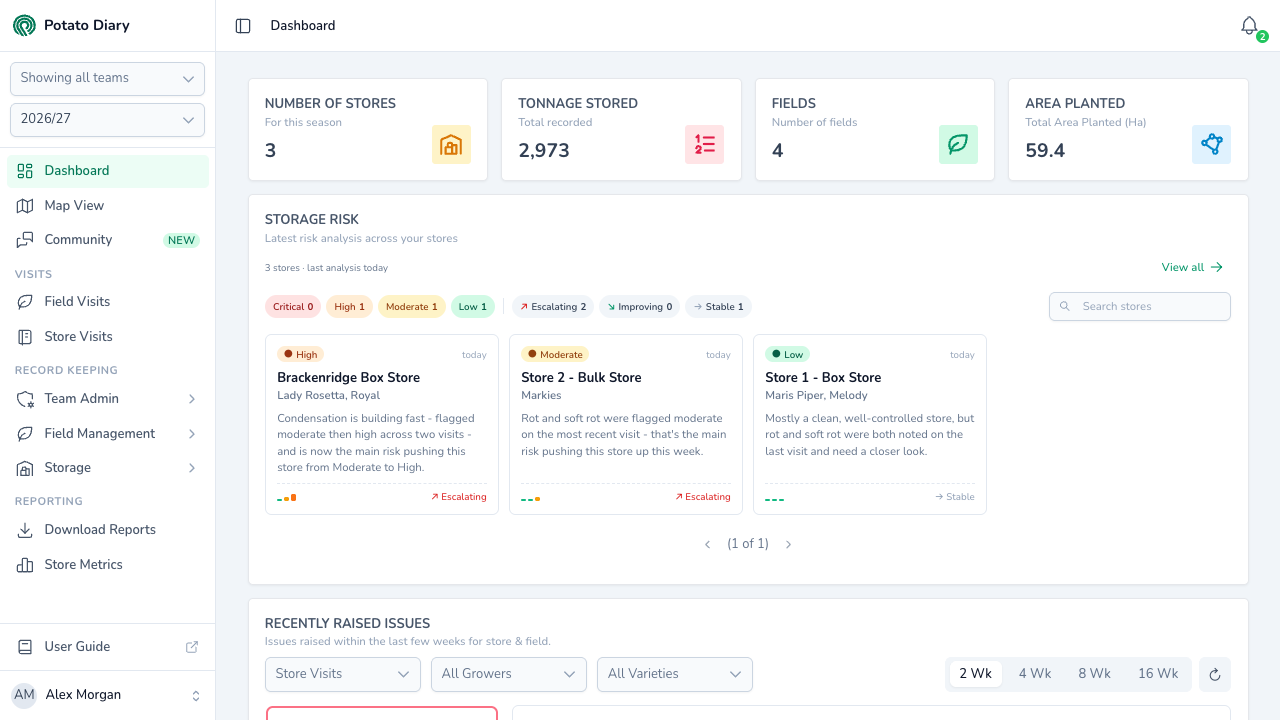
The screenshots in this guide use three demo stores:
- Brackenridge Box Store is High. Condensation dripping onto the boxes was tagged as a High-severity issue on the latest visit.
- Store 2 - Bulk Store is Moderate. A pocket of soft rot was tagged at Med severity on the latest visit.
- Store 1 - Box Store is Low. Nothing serious has been reported.
What the bands mean
| Band | What it means |
|---|---|
| Critical | Crop loss is happening now or is about to. Act straight away. |
| High | Something is seriously wrong in the store, even if the crop isn't being lost yet. |
| Moderate | One thing is worth watching, or a few small things are adding up. |
| Low | Nothing in the records points to a problem. |
The band isn't an average. Potato Diary looks for particular warning signs, and the worst one it finds sets the band. Most of those signs come from what's recorded on visits, so the latest visit matters most.
What makes a store Critical
Any one of these:
- An issue that means crop loss is tagged at High severity on the latest visit. That covers rots (soft rot, dry rot, pink rot, watery wound rot, gangrene, fusarium), blackleg, breakdown, late blight, and an ammonia or off smell.
- A rot or other disease that the notes on the last two visit dates describe as getting worse. Words like spreading, getting worse, increasing or now also in the notes count. This only applies when the Disease score is 8 or more.
- Sprouting is reported in the latest visit's notes, and the crop has also used up most of its dormancy (the Accumulated temp score is 7 or more).
- At least two of Sprouting, Disease and Flagged Issues score 7 or more.
What makes a store High
Any one of these, when nothing has made it Critical:
- Any issue tagged at High severity on the latest visit. It might be condensation, a fan or fridge fault, or sprouting. A High tag is serious on its own, but only a crop-loss issue makes the store Critical.
- The Flagged Issues score is 9 or more, because several serious issues have been tagged on recent visits.
- Sprout suppression has lapsed. The last treatment is well past the product's usual interval, or the ethylene supply has stopped. The Sprouting score is 7 or more and the Accumulated temp score is 5 or more.
Brackenridge Box Store is High for the first reason. Its latest visit tagged Store Condensation at High severity. Condensation isn't crop loss, so the store is High rather than Critical.
What makes a store Moderate
Any one of these, when nothing has made it High or Critical:
- One of Sprouting, Disease or Flagged Issues scores 7 or more. For example, a rot tagged at Med severity on the latest visit puts Disease at 8 or more.
- Sprouting is reported in the latest visit's notes. Notes such as eyes starting to move or first signs of eye movement count. No sprouting doesn't.
- The Accumulated temp score is 7 or more: the crop has used up most of its dormancy.
- The Temperature control score is 7 or more: the store keeps running well away from its set point, or the temperature swings widely.
- Two of Sprouting, Disease and Flagged Issues score 5 or more.
- The Store capability score is 8 or more, and Accumulated temp is 5 or more.
Store 2 - Bulk Store is Moderate for the first reason. Soft rot was tagged at Med severity on its latest visit.
Low
A store is Low when none of the above applies. Store 1 - Box Store mentions an odd soft rot in the notes of one visit. Nobody tagged it as an issue, so that note on its own isn't enough to move the band.
How tags and notes are read
- Severity is your call. When you tag an issue on a visit, you choose Low, Med or High. Low tags count for little; Med and High are what usually move a band.
- Tags count most on the latest visit. A High tag only sets the band while it's on the latest visit. Older tags count for less as they age: about half after two weeks.
- If a problem persists, tag it again. Tag it on each visit at the severity it is now. When it's sorted, leave it off. The band follows what the latest visit says.
- Notes are read for warning words. Disease names, sprouting and words like spreading or getting worse all count. Saying something isn't there, such as no rots seen or no sprouting, is read as absence. No further sprouting is still read as a sprouting report.
- A crop still cooling after loading isn't counted as drift. While the temperature is falling towards a new set point, Potato Diary doesn't count the gap as temperature drift.
The Current Storage Risk card
Open a store from Record Keeping › Storage › Potato Stores. The band chip sits next to the store's name, and the Current Storage Risk card is at the top of the Details tab. Click the chip to open the full analysis.
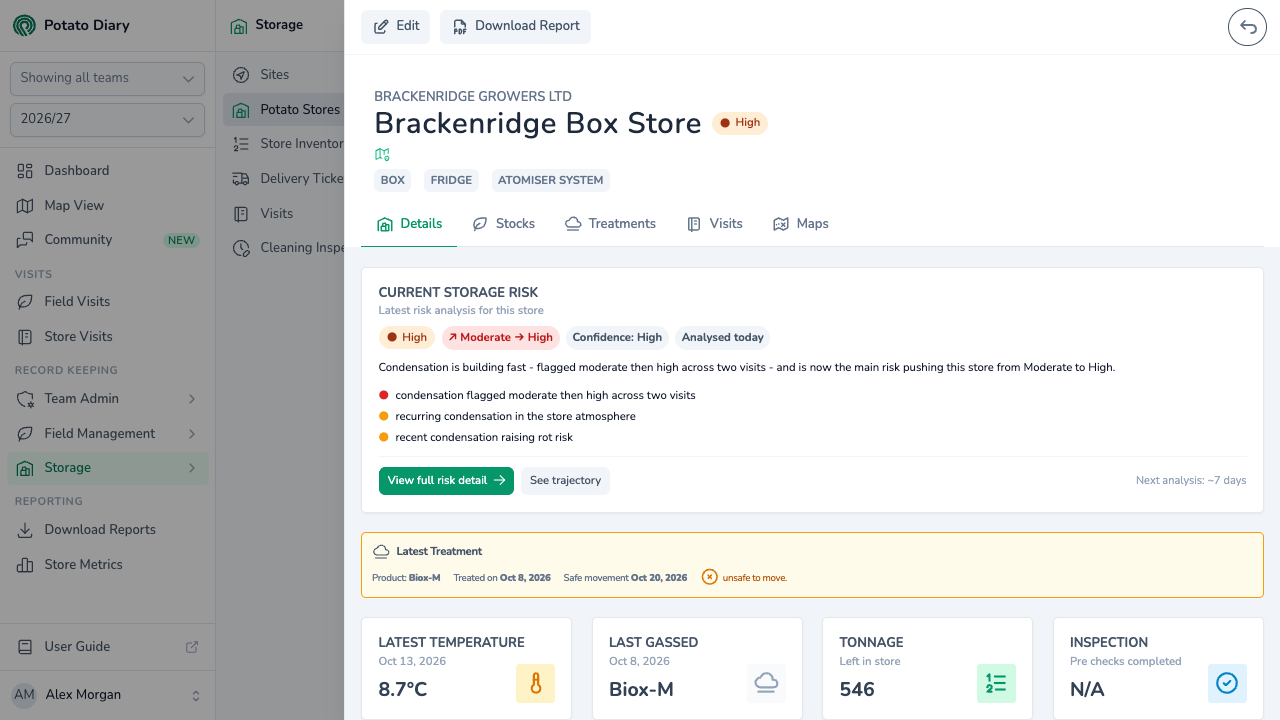
The card shows:
- The band. Stale appears next to it when the analysis is out of date.
- The change since the previous analysis. For example, ↗ Moderate → High means the store went up a band. ↘ means it came down, and → means it stayed the same.
- Confidence: how much evidence the analysis had to work with. See Confidence.
- Analysed: when the analysis ran, for example Analysed today.
- The headline, and up to three of the main reasons behind the band.
View full risk detail opens the risk detail panel. See trajectory opens the same panel.
Next analysis in the bottom corner is when the store is next due to be analysed if nothing changes. A new visit brings it forward. See When stores are analysed.
If the store hasn't been analysed yet, the card says Risk analysis pending. Stores are analysed after each visit and again overnight.
The risk detail panel
The panel opens on the right from the Dashboard's store tiles, the store's chip, the Current Storage Risk card and visit cards.
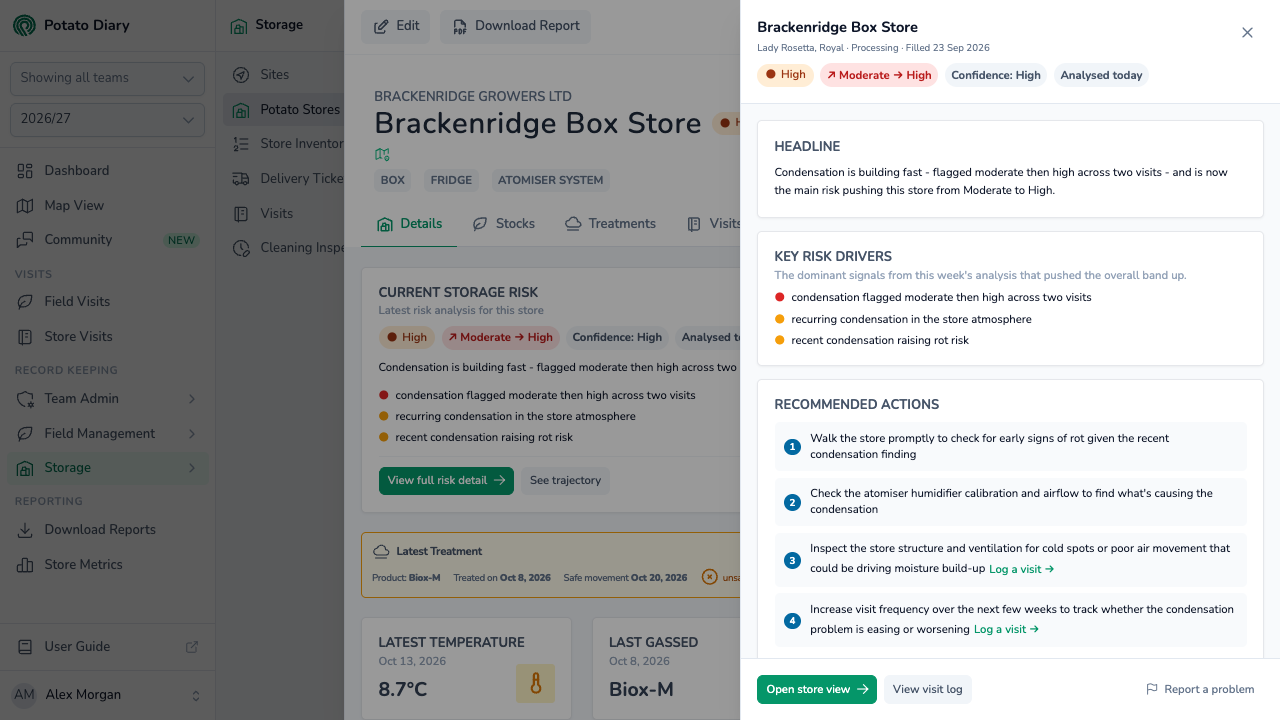
At the top are:
- the store's name, its varieties, its market sector and when it was filled
- the band
- the change since the previous analysis
- the Confidence tag
- when the store was analysed
Below that are:
Headline: what's driving the band, in one sentence.
Key Risk Drivers: the main things pushing the band up. The dot beside each one is coloured by the score of the category it comes from: red for 7 or more, amber for 4 to 6, green below 4.
Recommended Actions: what to do next. Some actions have a link, such as:
- Log a visit →: opens the Visits tab.
- Record treatment →: opens the Treatments tab.
- View issues →: opens the Visits tab.
- Edit store config →: opens the store's configuration.
- Log a variety →: opens the stock dialog.
You only see a link if you're allowed to use it.
Risk Categories
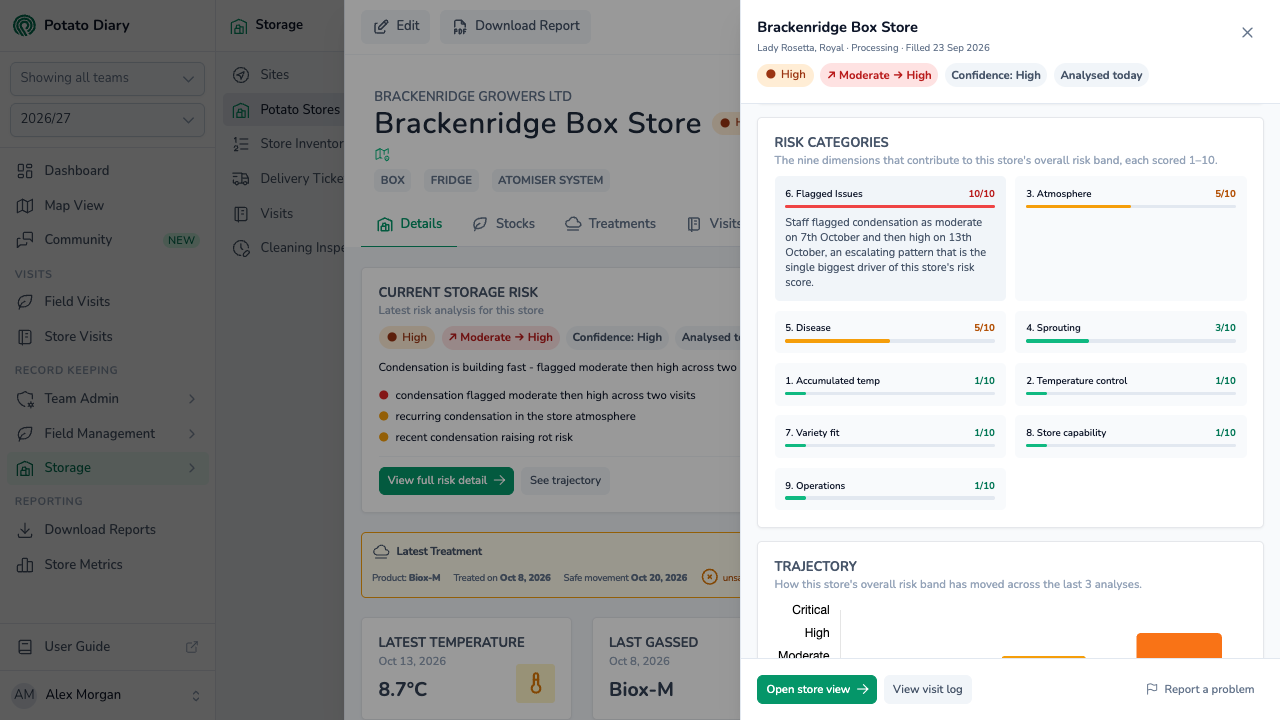
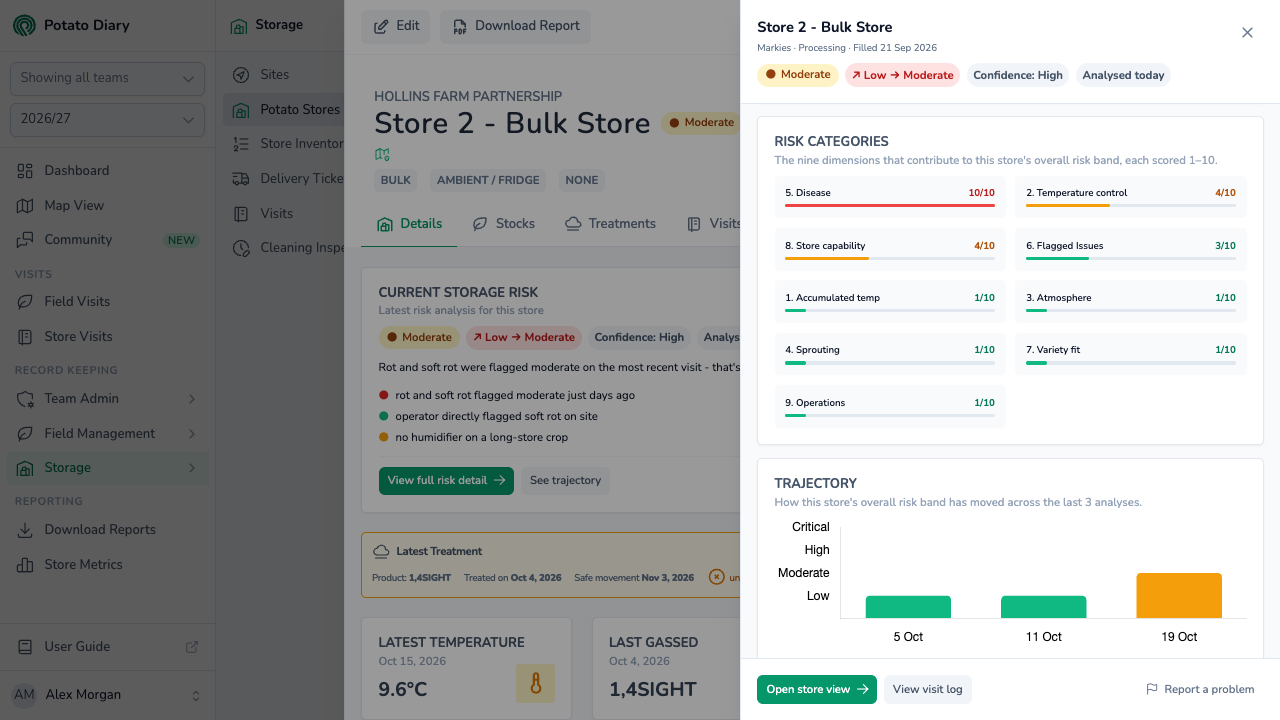
Risk Categories shows the nine areas Potato Diary scores, each out of 10, highest first. The bar is green below 4, amber from 4 to 6 and red from 7. Click a category to read why it got that score. Click it again to close it.
| Category | What it looks at |
|---|---|
| 1. Accumulated temp | How much of the variety's dormancy the crop has used up. It counts the warmth above 4°C since filling and compares it with the variety's dormancy figure. It allows for a longer dormancy once the store has had a sprout suppressant. |
| 2. Temperature control | How far the store's average temperature sits from its set point, and how far it swings between minimum and maximum. Recent visits count most. |
| 3. Atmosphere | Condensation mentioned in the notes. A gap of more than 2°C between the air or duct and the crop on recent visits. A humidifier that's fitted but logged zero run hours on every visit in the last 90 days that recorded them. |
| 4. Sprouting | Whether sprout suppression is up to date for the product used, or ethylene is holding at its target. Sprouting reported in the visit notes. |
| 5. Disease | Rots and other diseases named in the notes, and whether they're one-offs, holding steady or getting worse. A rot tagged at Med or High severity on the latest visit scores highly whatever the notes say. |
| 6. Flagged Issues | The issues tagged on visits and their severity, with recent tags counting most. A High tag on the latest visit scores 10. |
| 7. Variety fit | Whether the variety suits the market sector and has been stored past its usual window. Whether the set point suits the crop: 11–16°C while it cures in the first 14 days after loading, then the holding range for its sector. |
| 8. Store capability | Whether the store can hold this crop for this long. For example, an ambient-only store holding a long-store variety into summer, or a bulk store with no humidifier after four months. |
| 9. Operations | Whether the same action keeps being written on visit after visit without being resolved. |
Atmosphere, Variety fit and Operations are there for context. They never change the band on their own. Store capability only counts towards Moderate, and only alongside a high Accumulated temp score.
A category Potato Diary can't score for this store is listed under the grid as Not applicable for this store. For example, Accumulated temp and Variety fit need to know the variety.
The scores don't add up to the band. A store can have one category at 10 and still be Moderate. Store 2 - Bulk Store scores 10 for Disease: soft rot is tagged at Med severity and the notes name it too. The band stays Moderate because the tag is Med, not High.
Trajectory
Trajectory charts the store's band at each of its recent analyses this season, oldest on the left. Hover over a bar to see that analysis's band, date, headline and drivers.
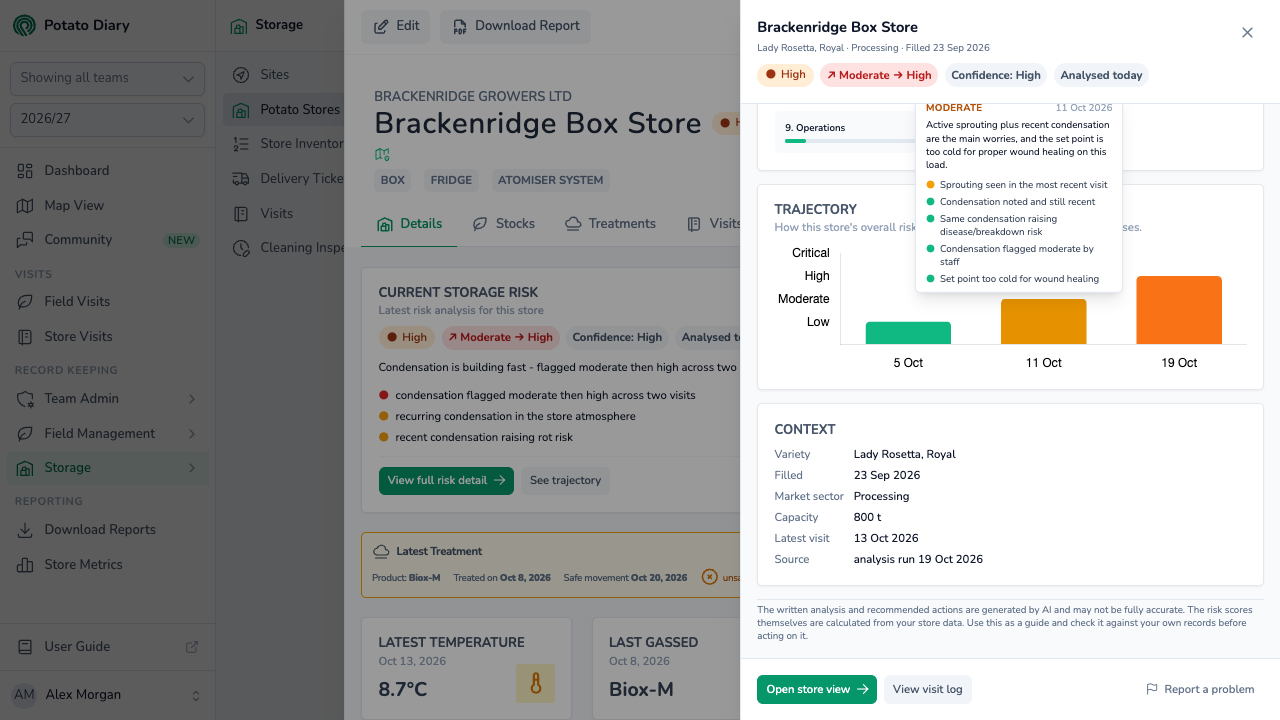
Brackenridge Box Store went from Low on 5 Oct to Moderate on 11 Oct and High on 19 Oct:
- 5 Oct, Low. The only visit so far found the crop a little wet on top, and nothing more.
- 11 Oct, Moderate. The 7 Oct visit reported first signs of eye movement on the Lady Rosetta. Sprouting reported in the latest visit makes a store Moderate. That visit also tagged condensation at Med severity. Biox-M was applied the next day.
- 19 Oct, High. The 13 Oct visit found condensation dripping onto the boxes and tagged it at High severity.
The chart appears once a store has two analyses. Until then it says Trajectory will appear after the next snapshot.
WARNING
See trajectory on the Current Storage Risk card opens the panel at the top rather than at the Trajectory chart. Scroll down the panel to reach it.
Context
Context lists the facts the analysis used:
- Variety
- Filled: the store's loading date
- Market sector: taken from the plantings the stock came from
- Capacity
- Latest visit
- Source: when the analysis ran
If no variety is recorded and you can add stock, Log a variety → opens the stock dialog.
The written analysis
Potato Diary works out the bands and the category scores from your records. AI writes the headline, the drivers, the recommended actions and the explanation behind each category. The note at the bottom of the panel says which you're reading. If the AI isn't available, a plainer summary is built straight from your store data instead.
The AI's wording can vary from one analysis to the next, and it can be wrong. For example, it can describe a rot that was only mentioned in the notes as "flagged". Check it against your own records before you act on it.
In rare cases the AI can move the band up or down. It does this when it sees a risk the categories can't, such as a fridge fault that keeps coming back. It has to give a reason, or the change is ignored.
WARNING
The panel doesn't show when the AI has changed a store's band, or the reason it gave.
The buttons at the bottom
- Open store view: opens the store's Details tab.
- View visit log: opens the store's Visits tab.
- Report a problem: tell the Potato Diary team what doesn't look right. Type what looks wrong and click Send report. Your report is sent with the details of the analysis.
Risk on visit cards
Each store visit card can show a band pill beside the visit date. It's the store's risk from the analysis that ran just after that visit, so the cards show how the band changed visit by visit. An arrow such as ↗ Escalating shows which way the band moved since the analysis before.
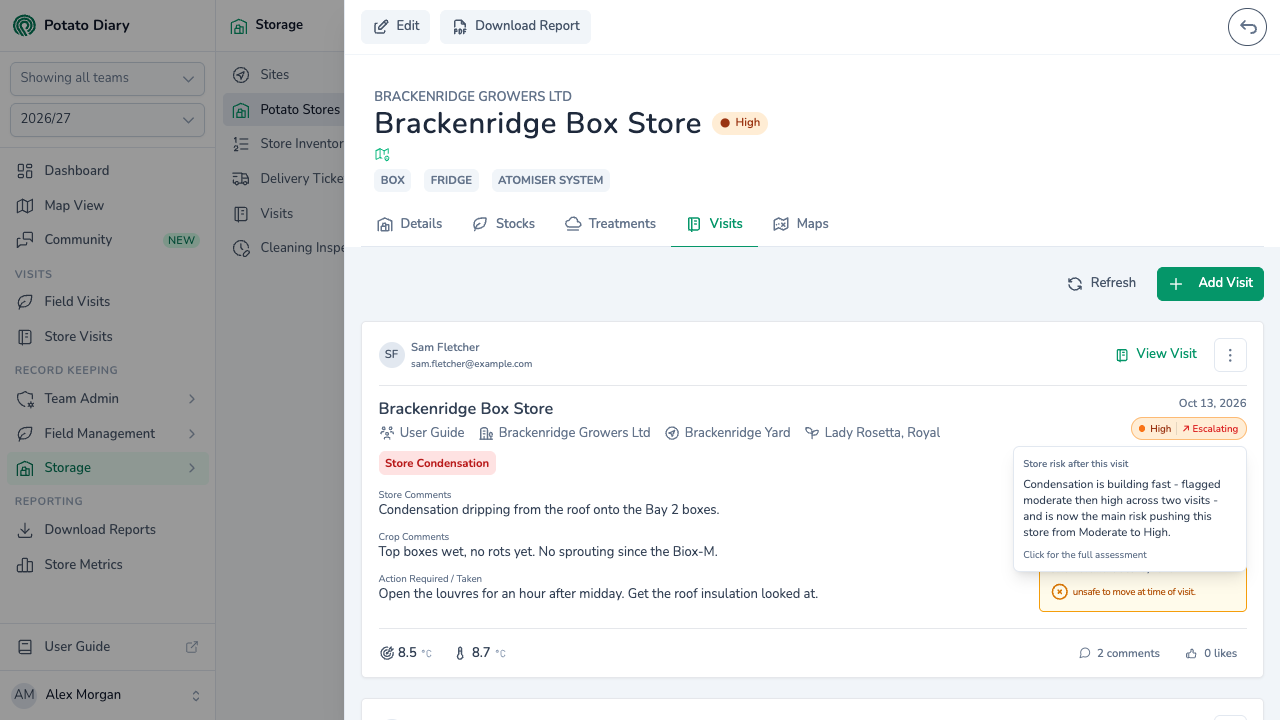
Hover over the pill to read the headline. Click it to open the full analysis as it was then. The panel shows As of and the date of that analysis. On a touch screen, tap the pill to show the headline under it, then tap the headline for the full analysis.
Not every visit has a pill. A visit only gets one if an analysis ran within a week of it, before any later visit was recorded.
When stores are analysed
- After a visit. A store is analysed a few minutes after a visit is saved or edited. If several visits are saved close together, it's analysed once, after the last.
- Overnight. Each night, any store that hasn't been analysed for a week is analysed again. So is any store that has had a visit added or changed since its last analysis. This catches changes that don't need a visit, such as the crop using up its dormancy or a treatment falling due.
Each analysis replaces the one before for that day, so a store has one analysis a day at most.
Stale, N/A and pending
- Stale appears beside the band when the latest analysis is more than 10 days old. The band may no longer be right.
- N/A replaces the band when the store's latest visit is more than 28 days old, or it hasn't been visited this season. Potato Diary assumes the crop has probably left the store, or hasn't gone in yet. These stores drop off the Dashboard's Storage Risk card. Record a visit to bring the store back.
- Risk analysis pending means the store hasn't been analysed this season. It will be overnight, or after its next visit.
Confidence
The Confidence tag shows how much evidence the analysis had.
- High: at least seven of the nine categories could be scored, and the variety, loading date and market sector are all known.
- Medium: enough to go on, but something is missing. Usually it's the variety, the loading date or the market sector.
- Low: no visit has any notes, or fewer than five categories could be scored.
To raise it, keep stock records up to date so the variety is known. Set the store's loading date, give the plantings a market sector, and write notes on visits.
Variety unknown and missing variety data
Variety unknown, in red on a Dashboard store tile, means no variety is in store at the latest visit. The store has no stock recorded. Add the stock to fix it. Log a variety → in the panel's Context card is a shortcut.
Sometimes a variety is recorded but Potato Diary has no dormancy or storage figures for it. Accumulated temp and Variety fit then show as not applicable, and confidence drops. You don't need to do anything. The Potato Diary team is told automatically, so the figures can be added.
What to do about each band
- Low: keep visiting and recording as usual.
- Moderate: read the Key Risk Drivers and keep an eye on them on your next visit. Re-tag any issue at its current severity so the band stays accurate.
- High: work through the Recommended Actions and visit more often until the problem is under control. Note what you did in Action Required / Taken on the visit.
- Critical: inspect the store as soon as you can. Deal with the affected crop, and talk to whoever advises you or buys the crop about moving it.
If a band looks wrong, check the latest visit first: its tags and their severity. If it still looks wrong, use Report a problem in the panel.
What's next
- Comments, likes and mentions — Discuss a visit with your team and bring a colleague in with @.
- Potato Store Visits — Record the visits, notes and issue tags the analysis reads.
- The Details tab — The store's risk card alongside its temperatures, runtimes and stock.